In the modern educational and professional landscape, issuing digital certificates is no longer a luxury it is a necessity. Schools, colleges, universities, and online training centers require a reliable, secure, and automated way to issue, manage, and verify credentials. This is where the LM Certificate Publisher (LMCP) comes into play.
LMCP(LM Certificater Publisher) is a robust, highly extensible WordPress plugin designed specifically to handle academic and professional credentials. It allows institutions to transition from manual, tedious paper-based systems to a dynamic, searchable database directly on their website. In this comprehensive guide, we will walk you through the entire WordPress setup of LMCP, from initial installation to advanced configurations like custom fields, frontend search, and automated PDF printing.
What is LM Certificate Publisher (LMCP)?
The LM Certificate Publisher is a specialized WordPress plugin that empowers organizations to publish verifiable student certificates. Unlike generic document management systems, LMCP is built from the ground up to address the specific workflows of academic registrars and training administrators.
With LMCP, you can create a dedicated repository of certificates that are fully searchable by the public or specific employers. This simplifies the student verification process, allowing third parties to instantly confirm the authenticity of a graduate’s credentials without needing to contact your administration office. Whether you are running a small local training center or managing a large-scale university portal, LMCP provides the tools necessary to handle digital credentials at scale.
Key Features of LMCP
Before diving into the installation, let us look at the core features that make LMCP the premier choice for certificate management on WordPress:
- Custom Certificate Post Type: Keeps your certificates completely isolated from standard blog posts and pages, ensuring clean data management.
- Categories & Tags: Allows you to organize certificates by department, graduation year, course type, or semester.
- Custom Fields: Enables you to store crucial metadata such as Student ID, Roll Number, Grade, Issue Date, and downloadable files.
- Frontend Search: A public-facing search portal powered by the
[lmcp_search_form]shortcode, requiring no user login. - Draft & Publish States: Provides administrative control over which certificates are publicly visible and searchable.
- Bulk Management: Tools to import, update, and manage hundreds of student records simultaneously.
Step-by-Step LMCP WordPress Setup
Setting up LMCP on your website is straightforward. Follow these steps to configure your digital certificate repository from scratch.
Step 1: Installing and Activating the Plugin
To begin your WordPress setup, log in to your WordPress administrator dashboard. Navigate to Plugins > Add New. In the search bar, type “LM Certificate Publisher”. Click Install Now, and once the installation is complete, click Activate. or you can directly download Zip file from wordpress.org
Upon activation, you will notice a new menu item in your WordPress sidebar labelled Certificates. This is your central hub for all certificate-related tasks.
Step 2: Exploring the Custom Certificate Post Type
One of the primary benefits of LMCP is that it registers a dedicated Custom Certificate Post Type. This ensures that your certificate database does not clutter your standard blog posts or portfolio items. When you click on the “Certificates” menu, you will see a clean interface specifically tailored for managing credentials.
To add your first certificate, click on Certificates > Add New. Here, you can enter the student’s name as the title, write a brief description or course overview in the editor, and begin assigning unique metadata.
Step 3: Organizing with Categories & Tags
As your institution grows, managing thousands of certificates can become challenging. LMCP solves this by utilizing native WordPress taxonomy structures, specifically tailored as Categories & Tags for certificates.
Navigate to Certificates > Categories to set up taxonomies such as “Computer Science Department,” “MBA Program,” or “Professional Certifications.” Use Tags for more granular tracking, such as graduation years (e.g., “Class of 2024”) or specific cohorts. This taxonomic organization makes it incredibly easy for administrators to filter records in the backend and for users to locate specific batches on the frontend.
Configuring Custom Fields for Student Verification
A certificate is only as good as the data it verifies. Standard WordPress posts do not support academic metadata out of the box, which is why LMCP relies heavily on Custom Fields.
When creating or editing a certificate, you will find a dedicated metadata panel. Here, you can input specific student details that are critical for student verification. These fields typically include:
- Student ID / Registration Number: The unique identifier assigned to the student by your institution.
- Roll Number: Useful for traditional academic systems.
- Grade / GPA: The academic performance achieved by the recipient.
- Date of Issuance: The official date the certificate was awarded.
- Certificate File: A secure upload field to attach the official PDF copy of the certificate.
These custom fields do not just display information on the frontend; they serve as searchable parameters. When employers or background check agencies input a Student ID into your verification portal, LMCP queries these custom fields to return an exact match.
Setting Up Frontend Search and Student Verification
The core utility of LMCP is its public-facing verification engine. By allowing third parties to verify credentials instantly, you eliminate manual administrative work and build trust in your institution’s certificates.
Deploying the Search Form
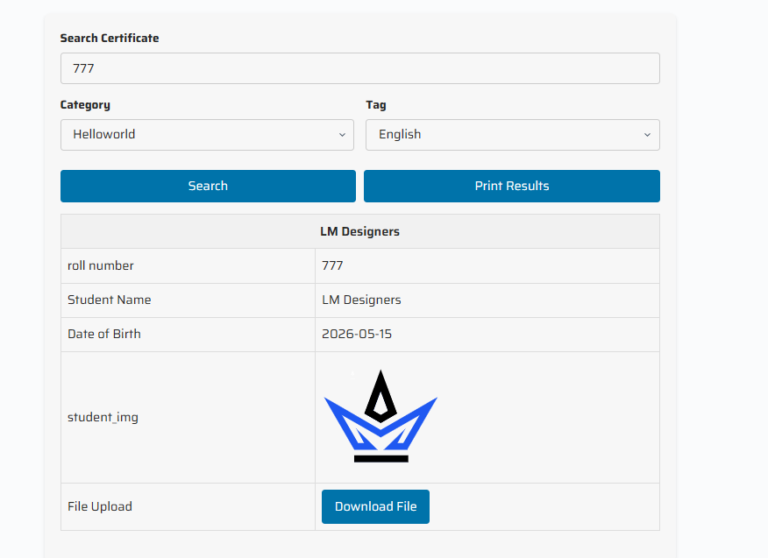
To set up a public verification portal, create a new page in WordPress (e.g., “Verify Certificate”). In the Gutenberg editor, add a Shortcode block and paste the following shortcode:
[lmcp_search_form]
Once published, this shortcode generates a clean, responsive search form on the frontend of your website. This Frontend Search requires no user registration or login, meaning employers can verify credentials instantly without jumping through administrative hoops.
How the Search Works
When a visitor inputs a Student ID, Roll Number, or Certificate Hash into the search form, the system queries the database. If a match is found, the system displays the certificate details, confirming the student’s credentials. If no match is found, it displays a secure “No Records Found” message, preventing unauthorized credential spoofing.
Additionally, search results include an option for users to Print Results. This allows employers to save a physical or digital copy of the verification receipt for their HR records, complete with a timestamp and verification seal.
Managing Certificates: Draft & Publish and Bulk Management
Managing an academic database requires strict quality control. LMCP provides robust publishing and administration workflows to ensure data integrity.
Draft & Publish Workflows
Not all certificates should be visible immediately. LMCP utilizes WordPress’s native Draft & Publish states to give your administration team full control. When importing new graduates, you can set their certificates to “Draft” mode. This allows registrars to review the metadata, double-check the student IDs, and verify grades before making the records live. Once verified, changing the status to “Publish” instantly makes the certificate active and searchable via the frontend portal.
Bulk Management for Large Batches
At the end of a semester, manually entering hundreds of certificates is highly inefficient. LMCP features built-in Bulk Management capabilities. Administrators can import certificate data via CSV spreadsheets directly into the Custom Certificate Post Type. During the import process, you can map spreadsheet columns to your custom fields (such as Student ID and Grades), assign them to specific Categories & Tags, and set their initial status to Draft for seamless batch processing.
Unlocking Advanced Features with LMCP Pro
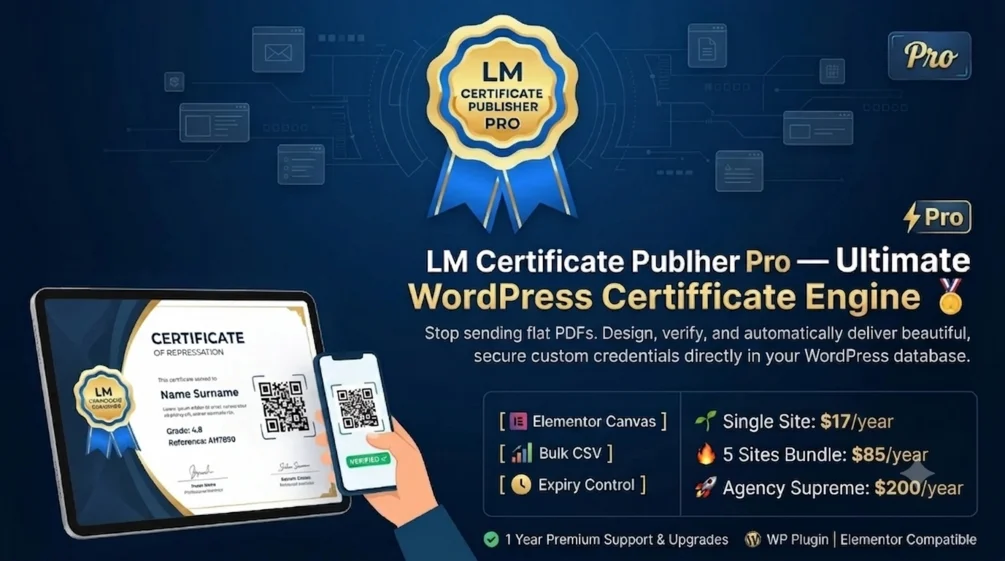
While the standard version of LMCP offers excellent foundational tools, the Pro version elevates your credentialing system to an enterprise level. Below is an overview of the advanced features available in LMCP Pro:
1. Sandbox Landscape PDF Printer Engine
Generating high-quality, printable certificates directly from a web browser can be challenging due to varying CSS rendering across different devices. LMCP Pro solves this by integrating a dedicated Sandbox Landscape PDF printer engine powered by html2pdf.js. This engine ensures that when a student clicks to print or download their certificate, the layout remains perfectly formatted in landscape mode, matching the professional aesthetic of a physical diploma.
2. Watermark Overlays
To prevent certificate forgery and unauthorized copying, LMCP Pro allows you to apply secure watermark overlays to your digital certificates. These watermarks are dynamically rendered over the certificate template, making it incredibly difficult for bad actors to alter the text or reuse the design layout.
3. Expiry and Validity Monitoring
Many professional certifications such as safety training, medical licenses, or IT credentials expire after a set period. LMCP Pro includes expiry and validity monitoring tools. You can set an expiration date within the custom fields, and the plugin will automatically update the certificate status to “Expired” once the date passes. It can also display a warning badge on the public verification page, ensuring that only current certifications are validated.
4. WooCommerce Integration Companion Extension
For businesses selling courses or training programs, the WooCommerce Integration companion extension is a game-changer. This addon automates the entire credentialing pipeline:
- Automatic Generation: Instantly generates a certificate when a customer purchases a specific product or completes a course.
- Customer Form Gathering: Collects custom details (such as the student’s preferred name spelling) during the checkout process.
- Email Delivery: Automatically emails the finalized certificate PDF directly to the student upon successful payment.
- Dynamic QR Codes: Places a unique QR code on each certificate. Anyone scanning the QR code with a smartphone is instantly redirected to the secure verification page on your WordPress site.
There are so many other features in LM Certificate Publisher PRO Like Elementor Design Templates, Expirations, Premium Widgets and many more explore all premium features of LM Certificate Publisher
Understanding LMCP Licensing and Expiry Rules
To maintain high standards of support, security, and updates, LMCP enforces clear licensing and expiry rules. It is essential to understand these rules when planning your deployment:
| License Type | Site Limit | Domain Locking | Renewal Rules |
|---|---|---|---|
| 60-Day Trial License | 1 Site | Permanently locked to the 1st activated domain | Non-renewable; must upgrade to commercial license |
| 1-Year Commercial License | Varies by plan | Flexible transfer within site limits | Requires active annual renewal for updates and support |
The 60-day Trial License is designed for testing and development environments. It is strictly bounded to one site and permanently locks to the very first domain where it is activated. This ensures you can fully test the plugin’s features before committing to a commercial plan. Once the trial expires, or if you need to move the plugin to a live production domain, you must transition to the 1-Year Commercial License to maintain active access to updates, security patches, and premium support.
Conclusion
Setting up a secure, scalable, and automated certificate verification system on WordPress does not have to be complicated. The LM Certificate Publisher provides all the tools necessary to manage academic credentials with ease. By leveraging the Custom Certificate Post Type, organizing your database with Categories & Tags, and deploying the [lmcp_search_form] shortcode, you can build a professional student verification portal in just a few hours.
Whether you start with the standard version to manage basic records or upgrade to LMCP Pro for advanced PDF printing, watermarking, and automated WooCommerce workflows, LMCP is the ultimate solution for modern educational institutions. Ready to streamline your certification process? Begin your WordPress setup of LMCP today!