Till 2026, creating certificate websites or a results portal for schools, colleges and training institutions on WordPress is very tricky; you have to use multiple plugins to get the thing that you are looking for, but still it’s not perfect.
There is a plugin which makes our work fast and easy. The use method of this certificate setup plugin is also easy to understand; even a non-technical user can easily understand it. We are talking about our latest plugin, LM Certificates Publisher. In this post, I am going to tell you how we can use this simple plugin to create certificate websites for free.
Table of Contents
How to install LM Certificate Publisher plugin
First, you need to install the plugin. It’s simple. At your WordPress admin dashboard, go to plugins>add new plugin and search LM Certificate Publisher, install and activate the plugin
You can also download the latest free version of this plugin from out github or website. You will zip file download and upload it in plugins>add new plugin>upload plugin.
How to create a certificate website: Step-by-step process
After plugin activation, you will find the certificates menu option under the tools menu. You will find these pages in the certificate menu
- All Certificates
- Add Certificates
- Tags and Categories
- Custom Fields
- Search Settings
How to add custom fields to our certificates?
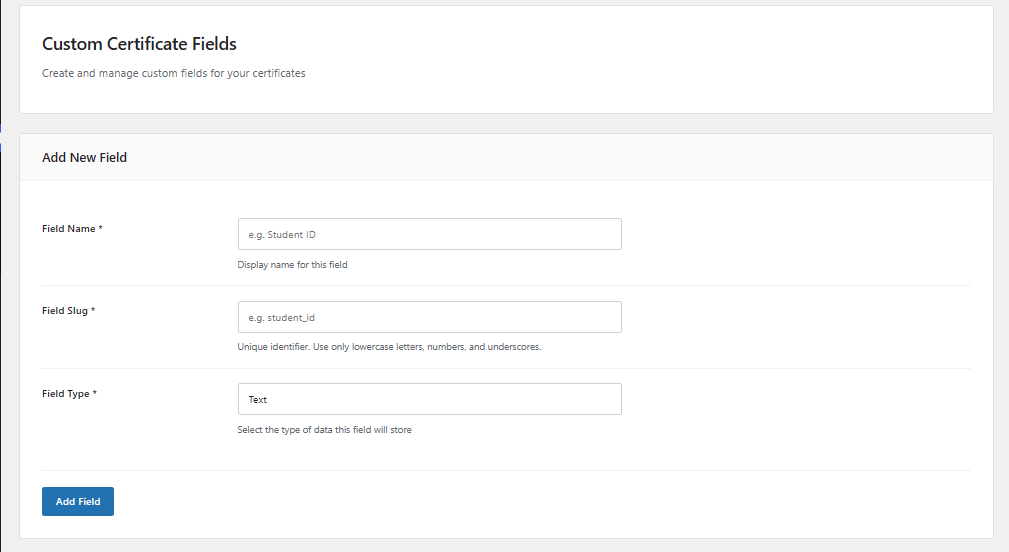
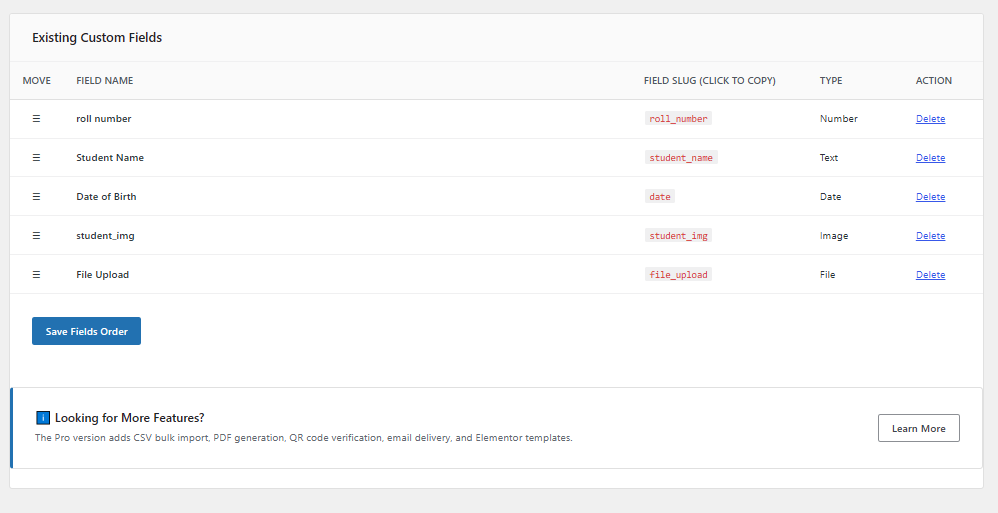
First, we need to add a custom field which we need in our certificates (let’s suppose we need these fields in our results card Name, Roll Number, Subject, Year, etc.) Add fields that we need, first add the name that would display on the frontend results. Then, you need to add a unique ID for that field and select the field type. There are multiple types; select the one you need.
How to add Certificates?
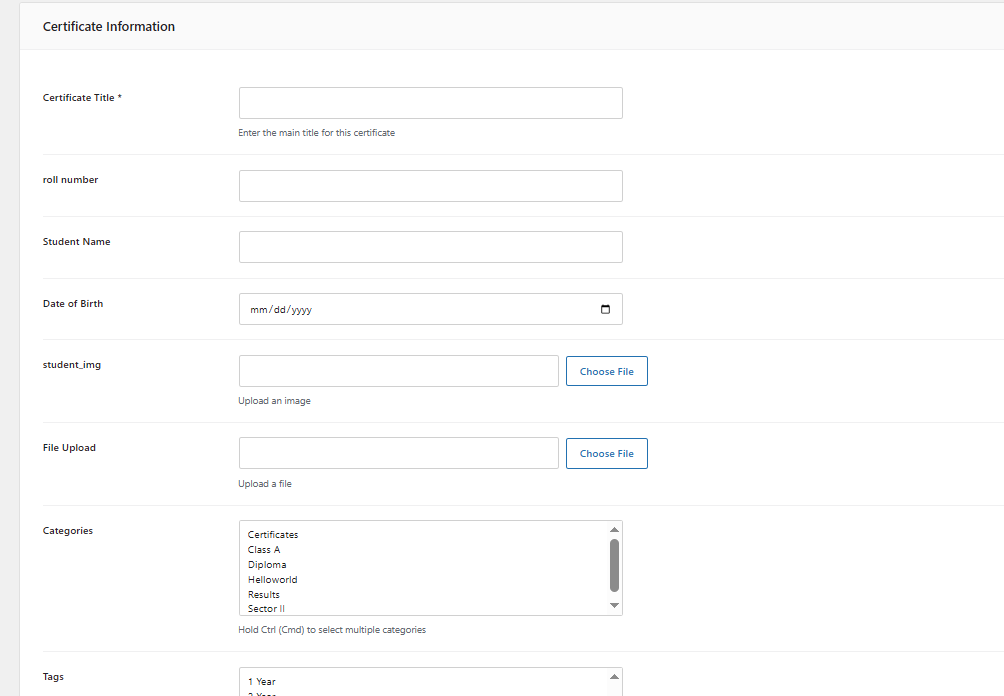
Here we are going to create our first certificate or result. As you can see, all the fields we created are there; we just need to fill in the data and publish. We can save them as drafts.
Categories and Tags In Certificates
Categories and tags give each certificate a unique identity and can also be utilised in the frontend search. For instance, if someone is looking for their verification approval, they need to enter their unique ID in the search input and select the year. The year can be represented as our tags or categories, which helps us provide the user with the exact data they seek.
If a user has two certificates with the same roll number, there’s a potential issue: if the roll number is used as the search query, the plugin will automatically display the first result, causing the user to overlook the second one. To enhance user experience, the use of the certificate website is very good. It allows students to specify what they are looking for, such as results for Math or English subjects.
How to select a custom field for search?
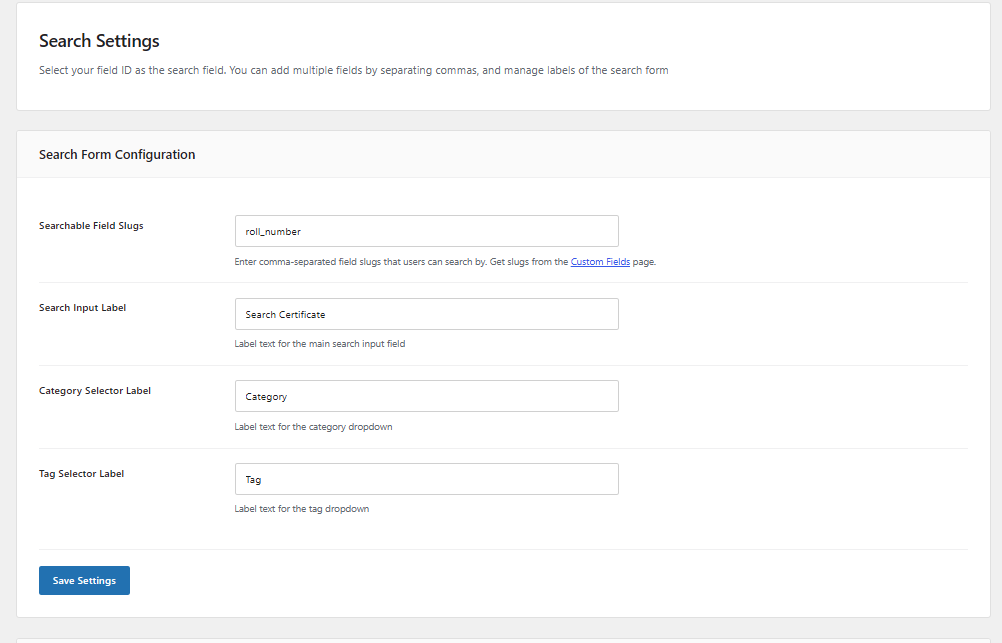
Here is one of the important part of the article, as you have seen up there we have designed multiple field, but now we have to decide on which fields exact data input the result should be displayed, like we are creating a online results setup for a school, we want the users can also get their data by searching their roll number in search form, any other data like his name or something else wont give any result.
as you can see in the image, we are using the slug or ID of that(roll number) custom field. You can find the custom fields slug or id on the custom fields page in red font colour, go to image. We can add multiple custom fields slugs by separating them with a comma.
How to display the search form on pages
On the bottom of the same page of the search settings, you would find the Shortcode section,
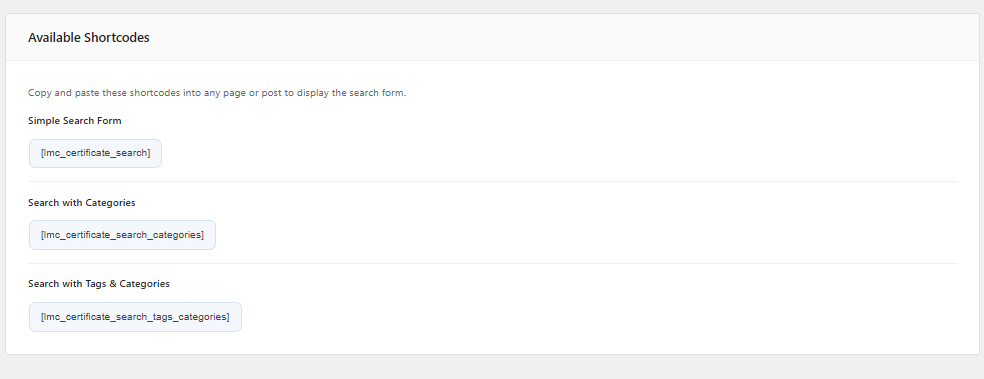
Simple Search Form
[lmc_certificate_search]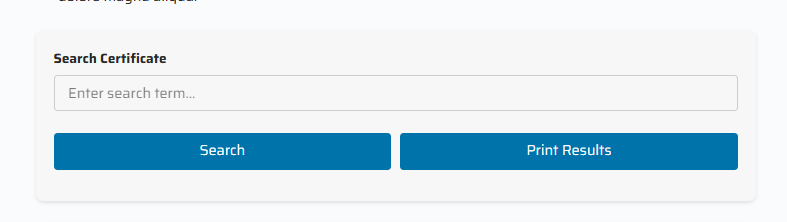
Search with Categories
[lmc_certificate_search_categories]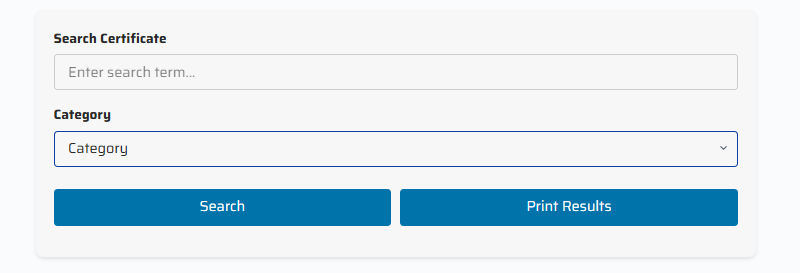
Search with Tags & Categories
[lmc_certificate_search_tags_categories]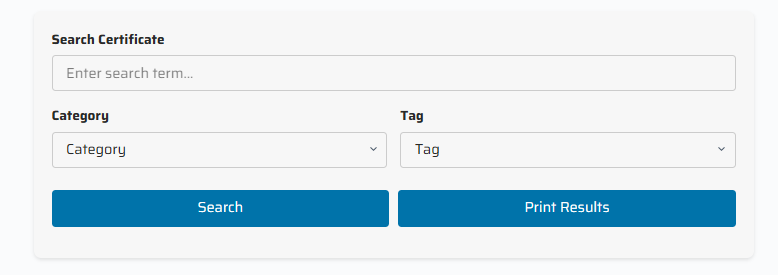
We can customise labels like “Search Certificates”, “Category”, and “Tag” to whatever we want.
How will it give results on the search?
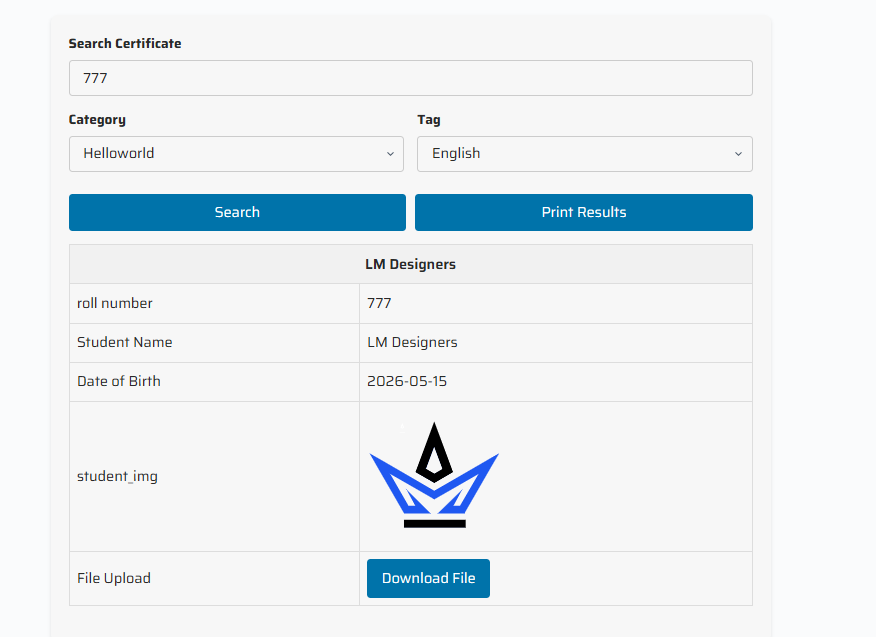
Here is the result of our search. We can also change the field position by dragging it on the custom field page. We can also get a PDF print of the result.
If you have a question, can I change the template of the search result? The answer is YES, but you have to use the PRO version of this plugin, where you will get tons of Premium features
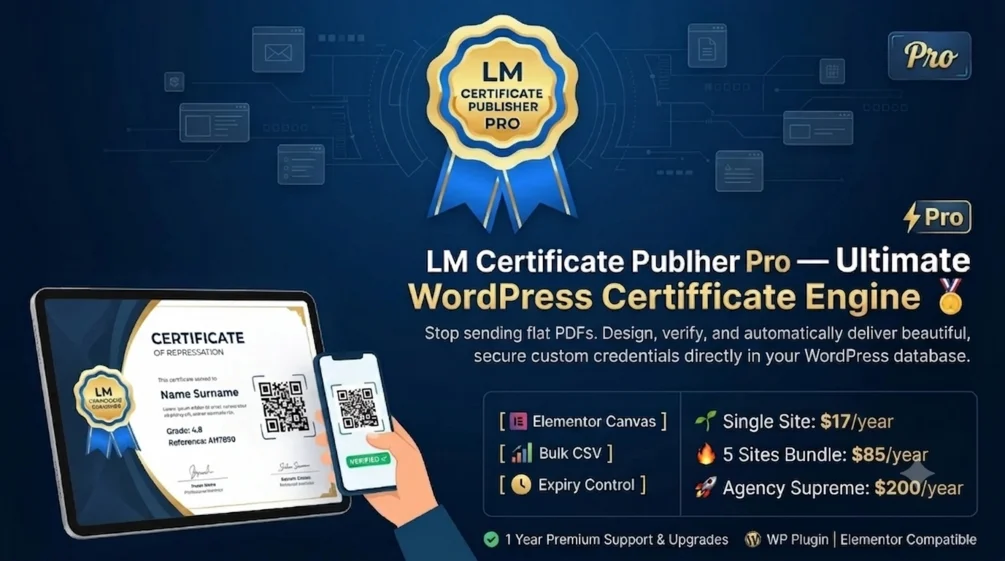
Why LM Certificate Publisher PRO is best for certificate websites and results portals
LM Certificate Publisher PRO
Advanced certificate management, verification, automation, and Elementor-powered design tools for modern institutions and training platforms.
Elementor Template Designer
Design stunning, fully customizable certificates visually with Elementor drag-and-drop controls and dynamic fields.
QR Code Verification
Every certificate receives a unique QR code for instant public authenticity verification without login requirements.
PDF Certificate Downloads
Generate professional print-ready PDF certificates with watermarks, signatures, and QR verification support.
Auto Serial Numbers
Automatically create searchable serial numbers like CERT-2026-000001 with customizable formats and prefixes.
Certificate Expiration Dates
Set expiry dates for time-sensitive certifications and automatically hide expired certificates from public searches.
Email Certificates to Students
Automatically send certificate information and verification links directly to students with customizable templates.
Bulk CSV Import
Import hundreds of certificates instantly using CSV uploads and automate category assignments with ease.
Advanced Elementor Widgets
Access dedicated widgets including headings, images, expiry notices, dynamic tags, search forms, and more.
Standalone Verification Page
Create a public verification page using shortcode support for serial number and QR-based certificate validation.
Category-Specific Templates
Assign different Elementor templates automatically for diplomas, completion certificates, and training records.
Print Button Control
Show or hide frontend print functionality anytime and fully control the certificate viewing experience.
Duplicate Prevention
Prevent accidental duplicate certificate issuance using unique searchable fields and validation protection.
Free vs Pro Comparison
| Feature | Free | Pro |
|---|---|---|
| Certificate Management | ✓ | ✓ |
| Custom Fields | ✓ | ✓ |
| Categories & Tags | ✓ | ✓ |
| Frontend Search | ✓ | ✓ |
| Elementor Templates | ✗ | ✓ |
| QR Code Verification | ✗ | ✓ |
| PDF Generation | ✗ | ✓ |
| Auto Serial Numbers | ✗ | ✓ |
| Email to Students | ✗ | ✓ |
| Certificate Expiration | ✗ | ✓ |
| Bulk CSV Import | ✗ | ✓ |
| Verification Page | ✗ | ✓ |
| Duplicate Prevention | ✗ | ✓ |
| Category Templates | ✗ | ✓ |
| Advanced Elementor Widgets | ✗ | ✓ |
With this pro version, you can modify anything you want; you don’t need Elementor PRO for templates or custom fields. We will provide you with a premium Elementor widget, which will help you. You can also use custom templates for all categories, like you want a different template for Category A and a different one for Category B,
You can also modify the search form. You don’t need to use the shortcode anymore; you will find an inbuilt Elementor widget for that. In a few words, this plugin is an all-in-one solution for Certificate websites and online results verifications. We can use this for fields like on offices, online billing, etc
If you are interested in creating a results and certificate website, you can HIRE US. We will modify the plugin according to your needs for better results and design.